Howto repair a broken USB flash drive

This is not the first time, I break a USB Drive. And I already heard some people complaining about the same stuff. But how is this possible ? Even if I use it a lot, memory and micro-controller are robust you know, no special reason for a failure (except of course some anormal write, but this is not the case here)

I decided to open this little key, to look closely. After a quick look, I didn’t find anything. So this little PCB stuff was laying on me desk, and people play with it. After a couple of weeks, I discover the memory chip is simply de-solder. My friend at work play so much with it, the failure is now apparent. Nice no ?
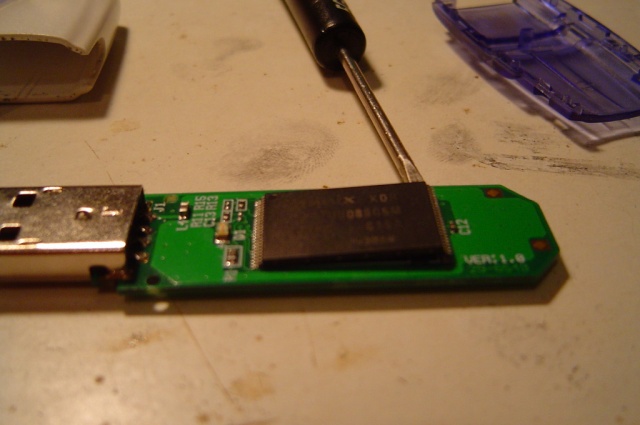
Hum, this little TQFN chip will be hard to solder, that’s right. But this is do-able no ? I tried this with a small soldering iron and here the result:
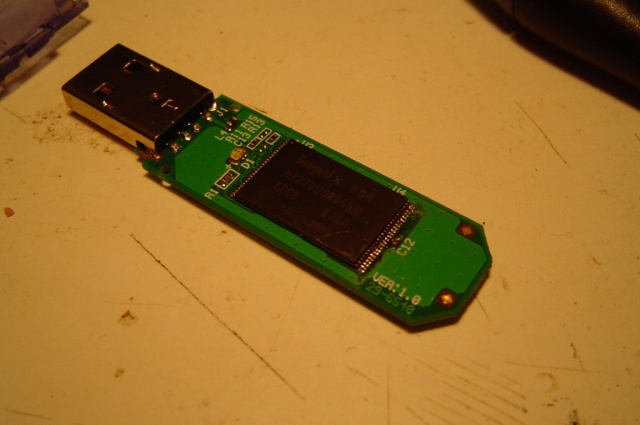
And yes, the key works fine right now ;) That’s fine no ? I definitively won’t trust this drive enought to store important document, but fine for a couple of mp3, or other..

Related posts :

admin April 30th, 2008


82 Responses to “Howto repair a broken USB flash drive”

  1. adminon 30 Apr 2008 at 1:42 am

    Before someone ask, I checked the filesystem with badblock. And even recover the data stored in the usb key

  2. ahmedbon 31 Jul 2008 at 11:43 pm

    Hi all of you.

    I’ve USB flash disk 128 MB.. but if store data sized only 30 MB it doest work and when i view the capacity its full? Why?

    Thank you.

  3. adminon 31 Jul 2008 at 11:52 pm

    Are you sure it’s a 128 MB ? (look like a 32MB) ..

    Check the disk partition (yeah, we can partition a usb stick too), and reformat the key.

  4. Etienne Le Sueuron 18 Aug 2008 at 1:45 pm

    I plan to try this tomorrow on a supposedly dead usb flash drive…

    #mount /dev/sdc /mnt/tmp

    reports “no medium”, which I’m assuming (hoping!) to mean that the controller chip (alcor micro 9385) is dead… I really need to get some data off this chip…

    What was the symptom of the dead drive you recovered like this?

  5. adminon 18 Aug 2008 at 2:09 pm

    Hum, the symptom was a cycling reset (disconnection …) of the device when I try to mount it. Not a “no medium found” ..

    Hope you will fix that.

  6. bsraton 22 Aug 2008 at 5:41 pm

    hi thanks i dont know what wrong my USB flse 1 GB sdenliy it dosent work it is not seen in the comp so what can i do

  7. sarzierainon 07 Oct 2008 at 12:48 pm

    u just de-solder and solder it again?!
    or you removed the chip?

  8. adminon 07 Oct 2008 at 10:02 pm

    Yeah, that’s it. Just de-solder / and solder it back :)

    Bye

  9. myaon 23 Oct 2008 at 12:46 am

    My brother snapped my USB drive in two, right down the middle. Is there somewhere I can send it where someone can repair it?
    Thanks

  10. adminon 23 Oct 2008 at 5:19 pm

    Does he break the memory chip ? If so, just drop it to the trash

    Bye

  11. Taraon 09 Nov 2008 at 12:51 pm

    Hi,
    I have Transcend USB Flash Drive. When it is installed in PC it shows CD ROM and does not open. Please I need assistance.

    Tara

  12. jasonlon 13 Nov 2008 at 7:09 pm

    I would afraid that the chip would get too hot. also, can you move the chip to another one?

    thanks

  13. adminon 13 Nov 2008 at 11:01 pm

    This kind of chips can handle around 300°C for about 2 minutes so..

    I don’t think you can change for another chips (due to timings issues)

    Bye

  14. khalidon 15 Nov 2008 at 11:30 am

    I ve a serious problem, when my friend plugin wrong my USB flash memory 128 MB it dosent work it is not seen in the comp so what can i do please reply
    Thanks

  15. blududeon 01 Dec 2008 at 12:14 am

    I dropped my laptop with a flash drive plugged in. The flash drive broke the fall, so the laptop was undamaged. But the flash drive broke. When I opened it up, I saw that some of the connections to the usb plug had torn off. I tried to re-solder them, but it doesn’t work. When I plug it into a computer, the light blinks for a fraction of a second. Windows won’t detect any type of device.

  16. adminon 01 Dec 2008 at 12:23 am

    Look closely at the controller and the memory pins. If it’s flash a second and then stop, this looks like the controller doesn’t achieve to read the memory chips, so broken traces should be here.

    Bye

  17. xaivioron 02 Dec 2008 at 8:39 am

    Hey, my PNY 2GB flash memory drive is no longer functional. There appears to be no broken parts… but I do NEED that data on there… it’s all of my work. Do you really think that desoldering and resoldering the “key”, as you call it, will fix my device? Please help…

    Thanks

  18. adminon 03 Dec 2008 at 11:12 pm

    Look closely at the chip, if nothing wrong .. your data are lost ..

  19. anuragon 23 Dec 2008 at 10:18 pm

    my usb sticks partitions are deleted by using portable linux and it beomes 3 and when i trying to make up it with windows xp bootable cd it says tht xp didnt support multiple partition so what can i do tell me plzz…….
    its not formatting and the message is come tht unable to format so what should i do????????
    reply soon…..

  20. Jeremy B.on 27 Jan 2009 at 9:42 am

    Great article, I wrote a similar article describing different types of failures that occur with USB flash drives which may help others having similar problems.

    How Flash Drives Fail

  21. koolguyon 14 Feb 2009 at 8:59 am

    i think is that good article and helpfull for me.
    http://www.id3.info : repair flash drive

  22. VJon 19 Feb 2009 at 7:38 am

    Hi there,
    My Kingston 4GB suddenly stopped working. Is there any way to recover the data. As you have replied to Xaivior’s question, you have said that to look closely at the chip and if nothing wrong, data are lost. Please let me know how the chip should look in order to de-solder and re-solder it to work.
    Thanks.

  23. Jkxon 19 Feb 2009 at 10:46 pm

    VJ, if you don’t know how it should look.. I’m wondering how you can de/re-solder it ..

  24. Baby-boyon 27 Feb 2009 at 2:09 pm

    Yo Chip headz is boy Baby-Boy My usb is not turning on when I plug it in my pc,and again it generates heat to much it get to hot……will the De/re-solder it work……….

  25. Katon 27 Mar 2009 at 6:10 am

    I NEED YOUR HELP!!! My friend pulled my USB2.0 8GB flash drive out wrong and now the silver part won’t go all the way down even though the slider goes as far as it can. I have a Verbatim. I will pay you any amount if you can get me the information off that flash drive. Please email me ASAP. See my website, and see why I need that stuff. I will lose hundreds of pics and all my movies. HELP ME!!!

    Kat

  26. Jenny-Lyndon 31 Mar 2009 at 4:36 pm

    hey my flash drive quit working on me and i kinda need it for my computers class im currently failing because all my work is on it and i cannot retrieve it. the computer reconizes that there is a usb plugged in but it doesnt allow me to open it. also it says that it needs to be formated which i cannot do unless i get all my documents off of it. i was comparing it to another flash drive the exact same brand and storage and the little gold things inside of where it goes inside of the usb port are pushed down. the light doesnt come on when plugged in eather. thanks.

  27. noelon 03 Apr 2009 at 3:19 pm

    The metal part on my flashdrive broke again this is the second time this has happened but not to the same drive. Is there some way to fix it or some place I can send it to get fixed?

  28. noelon 03 Apr 2009 at 10:18 pm

    How do I fix a broken Flash drive? The whole metal piece broke off today (you know the piece that goes into the usb port) well it broke off is there a way to fix it or a place to send it off? because this keeps happening and it is getting really aggrevating. and if you can also please give me some advice on how to keep this from happening again.

  29. adminon 07 Apr 2009 at 2:13 am

    To Noel, open the pen drive and solder an USB wire instead of the default plug .. that’s the only way I think.

  30. justinon 10 Apr 2009 at 9:29 pm

    my flash drive wont work is their someone that I can send it to to have it fixed I am willing to pay for it to be fixed I need the data off of it

  31. Jubanon 26 Apr 2009 at 3:55 am

    There’s Ebay guy that fixed my broken drive in less than a day for $45. You can find him if you search for “broken flash drive” on ebay. I just send it to him and download my files when he is done. Now I tell you how great help this is.

    J

  32. markon 23 May 2009 at 5:44 am

    hi,
    please help me…
    my flash drive is 2GB and when i look the capacity, it reveals 0MB, y?
    and when i tried to format it, it doesn’t work at all….
    please help me…what i am supposed to do …??

  33. usbon 11 Jun 2009 at 10:39 pm

    Hey, my USB can be detected when it is plugged in, but i can’t open it, it shows please enter a G disk when i try to open it.

    The light for the USB normally flashes when it is connected, but now it is not flashing.

    During these last few days, it’s been a bit weird, sometimes flashing and others times not flashing, but now, it has just sopped flashing.

    Is there anything i can do?????

  34. Mallaneon 11 Jun 2009 at 10:47 pm

    Hi, i have unfortunatly snapped the metal bit off my USB 4GB FLASH STICK, i am student with work to hand in which is saved on the USB how can i recover the information without having to pay ridiculous amounts of money such as £250 as i have been quoted from several companies? …
    P.S i understand absolutly nothing about USB sticks and this whole solder and desolder makes no sense to me! PLEASE EXPLAIN IN EASY TERMS…

    This is urgent please help. I need your help. Thank again x

    Mal

  35. adminon 12 Jun 2009 at 1:12 pm

    Mallane, this is technical stuff … so ..

    Please ask to a friend with solder knowledge to fix it, instead of asking here .

  36. Prasannaon 29 Jun 2009 at 8:39 am

    Hi,

    I have been using A-DATA 16G flash drive since a year. I have lots of data in it and recently its not getting detected in any desktops. Last time when am trying to access it while booting the desktop and the desktop hung up. I removed the flash drive when the desktop is hung up. Does that cause any problem to the flash drive? Now that drive is not getting recognized in any desktop/laptop. Is there a solution to fix this?

    TIA
    Prasanna

  37. Ryanon 18 Jul 2009 at 1:35 am

    I’m not trying to spam the board, but I do next day flash drive data recovery for $99 (or $69 for students). Just mail me your broken drive and I’ll have your files ready for download the next day. Please email me at 24hourdatarecovery@gmail.com or just go to my website. http://www.24hourdatarecovery.com

    Here are a few comments from my Ebay customers…

    “Very fast service. Recovered all my data. Highly recommended.”

    “Thanks. Was very prompt. Great to do business with.”

    “Honest and fast… will definitely recommend to my friends…”

    “Very honest, do not hesitate to use.”

    “Great service, as advertised. Thanks!”

    “Prompt Service, Spectacular Communications, and Excellent Service!”

    “Great communication – wonderful service. Highly recommended!”

    “Fast, honest, and a great price.”

  38. tauseefon 20 Jul 2009 at 6:12 pm

    hi

    my friend bought a new computer, and the person who assembled the motherboard,and made connections of the USB ports at the front of pc casing, he MADE WRONG WIRE CONNECTIONS.

    now three usb drives were connected to the FRONT USB PORTS of casing(which had wrong connections). And all three usb drives got damaged !!!!

    Which part of USBs has the probability to get damaged due to this ?
    Can these be repaired? ?
    Also, cld there be a simple issue like some resistor damaged ?? HEEEEEEEEELLLLLLP

  39. Ehsan Hamzeion 21 Jul 2009 at 5:59 pm

    i am from iran so my English is too bad ….
    but …
    my falsh memory is broken ( I think … ) when i plug it the computer show an error that “USB Device not Recognized ” what should I do …
    my usb driver is not broken because my other memory work …….

  40. adminon 21 Jul 2009 at 9:48 pm

    For Tauseef: hum, it’s look like the power regulator on the USB stick is dead, and perhaps the microcontroller too ..

    Try to find a way to repair them only if you have important data on, this will cost a lot of money I think ..

    Ehsan Hamzei: Perhaps try in another computer …

  41. Tauseef Omeron 24 Jul 2009 at 8:26 pm

    My problem was ::

    >>hi

    my friend bought a new computer, and the person who assembled the motherboard,and made connections of the USB ports at the front of pc casing, he MADE WRONG WIRE CONNECTIONS.

    now three usb drives were connected to the FRONT USB PORTS of casing(which had wrong connections). And all three usb drives got damaged !!!!

    Which part of USBs has the probability to get damaged due to this ?
    Can these be repaired? ?
    Also, cld there be a simple issue like some resistor damaged ?? HEEEEEEEEELLLLLLP

    ————

    My solution is :

    > i noted that as i connect usb drives to port, these dont heat up
    >then, i connected the usb to usb port, an grabbed a piece of wire, and started “shorting” Resistances on usb device, randomly.
    and at one resistor, the usb got detected, then i connect 10 ohm resistance(rather soldered) there,
    >same i did with otheer usb device board. and its too working, coz as indicated by admin, it was a power issue !! so resistor got damaged !!

    usbs are working coooooooll now , 24/7 !

    regards, Tauseef.

  42. linuon 05 Aug 2009 at 11:08 am

    see…… today by mistakly i droped my usb frm a height ……after some times when i plugged it into my computer there is no sign of working……..even the light doent come as before

    i am very worried about it as it contain my secreat documents…………..
    when i opened the flash drive a chip is broken ……….
    will it be able to repair??????help meeeeeeeeee

  43. Helpon 08 Aug 2009 at 3:24 am

    broken flash drive

    Hey, recentl7y broke my flashdrive in 2 pieces. Has any1 tried 24hourdatarecovery?
    If u have give me feed back cos i have a lot ofinformation on that 1 flashdrive and i need to get all of them back as soon as possible. Thanks.
    or if u know some1 else who can do it. Just recommend.

  44. karl michaelon 19 Aug 2009 at 8:44 pm

    can you help me to fix my kingmax 4gb
    my pc, on the internet cafe, and in the school.
    cant read my king max can you help me…
    you can txt me in my no. 09279811057

    thnks GUys

    =(

  45. michael cartillaon 26 Aug 2009 at 2:52 pm

    hi, can you tell me how to repair my kingmax 2G. the cause is it can’t be detected anymore

  46. Computer Repair Techon 31 Aug 2009 at 11:17 pm

    Hi All,

    I am a computer tech, but I rarely get involved in soldering. Last year, I broke my Samsung USB MP3 player and I used a local company (New Millennium Techs). I dropped off the device and it was fixed and ready the next day. It only cost $69 for the repair and it help up for 6 months until I lost the player in the park.

    I am not sure if they do mail-ins, but you can check. Here is their website: http://www.nmtechs.net

    -Steve

  47. Charlieon 02 Sep 2009 at 7:29 pm

    I used 24 Hour Data Recovery ( http://www.24hourdatarecovery.com ) to get data from a broken flash drive. I sent it regular US postal mail on Thursday, and even with the weekend I had the files on Monday night! I think that is pretty good service, and there was no way I was getting files off of this drive after trying to get it to work on many different computers.

    He was very easy to work with, too. I made a minor mistake on the info I gave him, and he didn’t give me a hassle about it and made the update within an hour.

  48. armadilloon 03 Oct 2009 at 9:06 am

    If the USB stick is not recognized in the PC or it is impossible to access the data on it, the controller on the stick is damaged. There is only one way to get the data back, unsolder memory chips and directly access their raw data with a programable chip reader. Software can’t help, that is a physical damage! Have a look at:
    http://card-recovery.biz/us/service.php

  49. rameshon 02 Nov 2009 at 7:03 pm

    hai

    i bought a kingston 32GB pendrive, unfortunately its not working, when i insert that it shows that removable disk(j):

    but what my problem is when i see the properties it shows 0bytes, when i copy the files to that pendrive its shows that please insert a disk into j:

    can you please tell me the solution for this…….

  50. Aamiron 08 Nov 2009 at 1:25 pm

    Hi,

    when i came back from school my KINGSTON 8GB USB MEMORY STICK was in my pocket and i forgot to take it out and i accidently put in in the washing machine and then in the drying machine! then i suddenly realized that my USB was missing, then i found it, but i couldnt open it !! it stoped working!! all my SCHOOL ASSIGNMENTS and ESSAYS are LOST I NEED HELP!!!

  51. Majidon 12 Nov 2009 at 5:44 pm

    Hi,

    I have 8GB Kingston USB with password protection. When I plug into computer it shows “Remove able disk” label, although I had put my own label on this. When I try to open it it shows “Please insert drive into x”. Also it show 0 bytes size now. I have very important data on it. Please help me.

  52. Ryanon 20 Nov 2009 at 1:59 am

    flashbackrecovery.com created a video that you will definitely find helpful if your cruzer micro has stopped working!!

    http://www.flashbackrecovery.com/_blog/USB_Flash_Drive_Data_Recovery_Blog/post/Flash_Drive_Data_Recovery_-_A_Look_Behind_the_Scenes/

  53. ricoon 22 Nov 2009 at 2:13 am

    hey bludude thats the same thing that happened to mine and i have to turn a project in on monday witch i am reallly f uped and i have pictures on there does the public libraries have power point on there computers

  54. Batistaon 30 Nov 2009 at 12:58 am

    hi, i attached the front usb and then booted up,pluged in my 4gig kingstone, and then my 4gigs died, i removed the flash cover nothing looks damged,also it makes alot of heat when attached to the pc, it wont even light up,any help please i need the info on it,Thanks

    here is some pictures please see them
    http://img25.imageshack.us/i/dsc00313n.jpg

    http://img28.imageshack.us/i/dsc00312w.jpg

  55. townjujuon 10 Dec 2009 at 12:45 pm

    guys i am using kingston data traveller 2.0. any time i plug the device,the icon will be flashing and will not staedy. what should i do. pls my email is townjuju@yahoo.co.uk

  56. Aisha patelon 22 Dec 2009 at 4:38 pm

    pleas help me
    my usb got dragged across the floor and the silver bit has completely come off and i dont know what to do
    it has a lot of important work on it
    what shall i do???
    please help meeee!

  57. GODon 25 Dec 2009 at 12:37 pm

    Use the force and wave your hand or use your heat ray vision to repair any broken solder joints. Come on people, you got to be kidding me. Flash drives are for transferring junk for fun, do not rely and these things to last as they are very fragile and break easy. Important files should be saved to e-mail or burned to DVD. If they break do not try to fix it, buy a new one. 8g drives go for $20… 4g for under $10… that’s to cheap!

  58. KCon 01 Jan 2010 at 10:30 pm

    my usb flash drive separated the medal prong n the memory card. Is there anyway 2 repair it? I have put them back 2gether but when I plug it into my computer nothing happens. I have a 2 or 3 gb flash drive full of music and I really don’t want 2 lose it. Please help!!!

  59. Tonion 04 Jan 2010 at 6:47 am

    my daughter walked by my computer and bent my usb drive the plastic cover came off and right were you stick the usb inthe computer it bent and was loose alsoat the end where you stick the stem in the computer on the green board has a crack in it i super glued it back and on the the top where it cracked at the stems came a loose so i solder it back together but it still doesent work. the chips were not damaged

  60. zogblart7on 07 Jan 2010 at 11:34 pm

    If you can only access a small protion of the usb key and there remains a large portion which is not available for use, then if you open a command prompt in Windows an type the following it should restore the data stick to fully working condition.

    diskpart
    list volume
    select volume n (where n is the number shown by list volume to be the one which is the small portion of the key which you can access)
    extend
    list volume

    after this, you should see the full size of the data key is ready for use.

  61. Totemon 29 Jan 2010 at 7:27 pm

    My classmate broke my flash drive when he plugged it in a broken usb port. Now it gets too hot for a second when I plug it in and Windows doesn’t recognize it either. Help anyone? I think it only has to do with the usb connector.

  62. luckyon 02 Feb 2010 at 10:07 am

    what luck i just hit my usb and it works hahaha

  63. Anantaon 15 Feb 2010 at 6:46 pm

    i have a micro SD chip. its memory 1GB but i cunt format the memory chip or can not delete any data.
    please help me

  64. taniaon 25 Feb 2010 at 9:38 pm

    the end part of my usb has came off from the usb that connects it to the computer and contains all important information. what can i do to fix it?

    this is URGENT as it has all my coursework in it…help!!!!!!!!!

  65. Dexteron 02 Mar 2010 at 8:21 am

    Hello,

    Just today I knocked into my USB Flash Drive while it was plugged into the computer. The head was then broken all the way off from the stick part of the unit. All components aside from the head still appear intact, however I think the memory stick part when the data is stored may have one or two prongs missing. I have tried several external USB heads and hot glue for the wires, but couldn’t get it to power on. I then put the original head back on plugged it into the computer and wiggled it; when i did the the red light stayed on steady but it detected nothing in the computer. Is there anyway to get this data back?

    Thanks.

  66. Audraon 20 Mar 2010 at 5:37 am

    I am trying to figure out how to repair a loose USB flash drive. It got stepped on once, and the plastic cracked. It still works, but every time I pull it out of the computer, the USB plug part comes out of the plastic case a bit. Is there a type of glue that is safe for this? I’m afraid one day it will come completely out.

    Any suggestions would be appreciated!

  67. LOKESHon 25 Mar 2010 at 7:39 am

    hi ,
    i have a pendrive of kingston 8 gb. before some time it is not working. an dlight is also not blinking please help it is posible to run my pen drive successfully.

    it is posible to repair pendrive in any service center?

    bye
    lokesh

  68. LOKESHon 25 Mar 2010 at 7:39 am

    hi ,
    i have a pendrive of kingston 8 gb. before some time it is not working. an dlight is also not blinking please help it is posible to run my pen drive successfully.

    it is posible to repair pendrive in any service center?

    bye
    lokesh
    lokeshnow@yahoo.com

  69. larryon 14 Apr 2010 at 9:33 pm

    my friend put my flash drive in upside down and forced it in and now it dont work i took it apart to see the damage and there seems to be no damage what can be done?

  70. Stevieon 16 Apr 2010 at 4:35 am

    Hey, My USB memory stick head (top metal part) has come off from the microchip. Both parts are in good condition. I have tried soldering them together but the computer does not recongnise it. Is there anything you can suggest, as i have all my coursework on there and my deadline is next week! Preferably can you send help to my email I have given or if not here. Thanks a lot.

  71. Saranjeon 23 Apr 2010 at 10:10 pm

    Thanks. I found out that my flash drive was not making proper contact. I don’t really have the tools to fix it but I did recover the information.

    Uff! :O

  72. lilyon 23 May 2010 at 1:36 am

    i have a toshiba 4 gb and when i plug it in to my computer it says usb device not recognized its not broken in half jus bent can i get my pictures back or jus give up ans buy another

  73. Deannaon 08 Jun 2010 at 2:22 pm

    Hi.. I have an 8GB USB that doesnt pick up on the PC.. when i shake it, it sounds like something is broken.. any suggestions??

    Thank YOu

  74. Brittion 23 Jun 2010 at 11:16 am

    Oh help me too i lost all my data from my flash after avirus attacked it.I ther anything i can do to get back my data.I usually make backups online with safecopy backup but this time i took long to make my backups.

  75. habib Faridoonon 26 Jun 2010 at 10:14 am

    my 4GP Kingston usb does not work probably.when i transfer movies or video songs from my friend computer to my computer they does not play full time they play one third of actual length.please help me.

  76. paulaon 13 Jul 2010 at 10:03 am

    hello i found ur site..plz help…i have accidental broke my usb stick from my pc..
    the part that broke is the silver like in your pictures above..not the chip just where it goes into the pc..can that be fixed and soldered ..plz it has many sentimental value pics of family.

    thank you look forward to a reply…i willl go to bed and cry now till i hear back

    thanks

  77. Robbie Hixonon 18 Jul 2010 at 1:42 am

    Hi,

    My Kingston 8 gb usb drive will not show up on my computer. I think the top part was jamed upward. How do I fix it?

  78. basir alion 20 Jul 2010 at 7:20 am

    hi, i attached the front usb and then booted up,pluged in my 4GB kingstone, and then my 4gb died, i removed the flash cover nothing looks damged,also it makes alot of heat when attached to the pc, it wont even light up,any help please i need the info on it,Thanks
    plz plz plz plz try to sort out my problem i’ll be very thankful to u….

    here is my id
    basir.khan12@gmail.com

  79. Malibuon 21 Jul 2010 at 7:12 pm

    some wiring was wrong on my computer for the USB two usb drives are not working now i open the usb drive and solder on it is fine.. do i have to unsolder it and resolder it??? its not picking up the flash drive at all…

  80. Farlordoon 09 Aug 2010 at 4:23 am

    My 2 GB Cruizer flash drive broke, the USB jack has been completely removed from the actual memory device, along with all the little connectors. Is there a way to re attatch the USB jack or get some one to retrieve data from it?

  81. rajon 15 Aug 2010 at 5:20 am

    hi
    my pen drive is adata 4gb .
    when i connect it with my pc then pc show the drive but give a command “please insert a disk”.

  82. kapilaon 20 Aug 2010 at 8:14 am

    my flash drive it not working.i unflug it when it was scanning.after that it not recognize.what to do i fix it ?

Comments RSS

Leave a Reply