
Last week I decided to build a map of the wireless access point in the Town. It is not really easy to find the right tools, so I decided to write this little Howto.
To archive this goal you need severals tools:
Kismet
First install Kismet. You need a wireless card that support RFMon in monitor mode. I think Madwifi cards, and patched Orinoco are the only ones that support this.
Launch Kismet, and now check for a given AP that kismet know the best level..
If everything is ok, edit the kismet config file and set gps=try
GPSDrive
Download and install the latest CVS version of GPSDrive (I have some issues with the latest tgz and kismet). The next step is to have a GPS working with gpsd. Most GPS will work, I bought a cheap one with a USB cord on ebay.
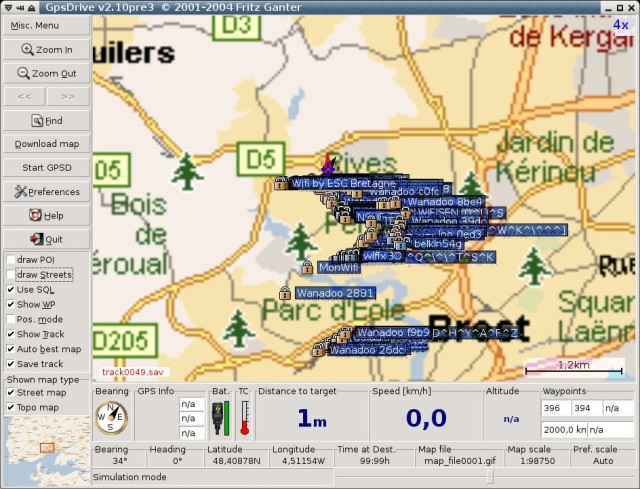
Simply launch gpsd, and after gpsdrive. You should see the reception level in GPSDrive.
MySQL
To use Kismet + GPSDrive, you need to have a MySQL database. In fact GPSDrive will ask to kismet the new APs, and dump this informations in a MySQL db. You can find the create.sql in GPSDrive sources.
mysql -u root -p < ./create.sql
This will add a user : gast / gast
First try
Ok, now launch GPSDrive and set the ‘use SQL’ (or edit the config file), and quit.
Now to start the whole stuff:
- Plug the wireless antenna (this is better for wardriving ;)
- Plug the GPS
- Launch gpsd (be carefull to have enought satellite in view)
- Launch Kismet (it should tell you, it find the GPS…)
- Launch GPSDrive (it should display a little kismet logo on bottom)
- Now, you’re ready to go, walk down the street you should see new APs on the GPSDrive map.
After the trip: Google Earth
Ok, now you have a lot of points in your database.. And GPSDrive have a little troubles to display them.. After a little time, i decided to install Google Earth, and look at the way to add new points on the map..
This, is quite simple, all i need to do is to extract data form the SQL, and build a xml file that contain all the points. I decided to write gpsdriveToGoogleEarth.py. This quick and dirty script will generate a file ‘ap.kml’. Now simply launch Google Earth and open this file. You will see something like this:

The main issue for me, is that Google Earth doesn’t support Linux right now so I need to dual-boot.. But this provide a easy way to build the card without too much pain. And i can share the Google Earth file others guys simply.
WARNING
I do this only for the fun, so don’t try to hack wireless access point using this howto, this is not the goal !
– Enjoy
How impressive! Thanks for this illustrated howTo.
I would be very interested in doing this same experience around the place of Nation (in the east of Paris), just to see. From my flat, last time I checked, I could see 5 different wireless networks.
Could you give the model of your GPS? I was looking for a cheap one (Garmin eTrex for example) I could connect to my laptop but the price (even on eBay) was too expensive…
I bought a GPS without LCD that only plug to the laptop using USB. It came from China, and cost me 36.5 Euro (fedex included..)
Look at:
;)
Thanks for the tip
“Any ideas why I would get a line 9 syntax error near unexpected token `(‘”
and
“line 9 ‘def h1():’”
Thanks for any help you can give.
JB
Where ?
Line 9
def hl():
print “=” * 80
It apprears it is having a problem with the () symbols.
Are you sure to run with python gpsdriveToGoogleEarth.py ? (because this works fine)
That was my problem. I was not running python gpsdriveToGoogleEarth.py. I also experienced a probelm with kitmet detecting 70+ APs but gpsdrive only recorded 1 (wep Enabled) in the MySql database. Any ideas.
Where can I get a copy of v2.10pre3.
John
I get the same issue (only one AP in gpsdrive). You need the latest CVS snapshot to fix this (not the 2.10pre3)
Is it possible you can email or post the CVS snapshot with instructions to fix the issue. It would be much appreciated.
This bug is fixed in the CVS (it only exist in the .tgz)
To download it. simply follow the GPSDrive doc at http://gpsdrive.kraftvoll.at/download.shtml
Blank password does not work. Any ideas.
After installing the CVS update it is no longer writting to mysql. I have run make uninstall on all and reinstalled pre2. What advise can you give on getting it installed right. Fedora Core 4 is the platform.
John
Simply install this in a different place. with a ./configure –prefix=/opt_for_example
ªLJMªLM
I found this tutorial about the KML (Google Earth) file format.
http://www.keyhole.com/kml/kml_tut.html
I kind of got inspired by your project here:
http://www.niquille.com/kismet-earth/
Would the person who originated this post consider emailing me. Would like to discuss hiring your obvious talents to setup a laptop to achieve the results in the images above.
Charles
Would the person who originated this post consider emailing me. Would like to discuss hiring your obvious talents to setup a laptop to achieve the results in the images above.
Charles
info@hcsdatarecovery.com
thi is very nice
capullos
esto es una puta ierda
awsome guys im going to go out and buy a usb gps tomorrow
this is great
fyi, there is now a version of google earth for linux
…Yeah… Leave em a warning telling them NOT to hack… that’s really gonna avert anyone from trying…
I’m also suffering from a problem mentioned above.
GPSDrive registers one WEP as a waypoint and then doesn’t bother with the rest. I can’t get the CVS solution to work as described. I enter the password in as blank and then nothing happens. It just sits there! Any ideas would be greatly appreciated.
Thanks,
Graeme
I run a certain programe with a gps device.
I find the cooridnates change often.
Yet the gps and the device it has logged is stationary.
In other words, min location & max location can change by over 200 meteres & more & differnt times of the day or lenght of time the gps has been running.
Any sugestions..
Hi, I modified your python script to work with the new gpsdrive mysql table. I hope you do not bother: http://www.efremigio.es/gpsdrive-y-google-earth/
At the moment avaliable only in spanish.
Thank you.
after running kismet, gpsdrive will not load. here’s the shell output:
SQL: connected to localhost as gast using geoinfo
Creating main window
kismet server found
Using Mapnik config file: /usr/share/gpsdrive/mapnik/osm.xml
Read 503 POI-Types from /usr/share/gpsdrive/map-icons/icons.xml
Error while using mysql
Table ‘geoinfo.wlan’ doesn’t exist
google search on ‘geoinfo.wlan’ turned up absalutaly nothing.
please help
thanks
just looked at the shell output from kismet:
WARNING: Disabling GPS logging.
WARNING: Could not open waypoint file ‘~/.gpsdrive/way.txt’ for writing: No such file or directory
I checked, and that filepath DOES exist.
?
and this from gpsdrive:
wlan_rebuild_list: Error in query: Table ‘geoinfo.wlan’ dosen’t exist
Will, you need to create the database (check the MySQL section of this post)
Well , I reinstalled Ubuntu, and at least now kismet is working.
Then i did the create.sql bit and i’m getiing:
connection to host=/var/run/postgresql dbname=gis user=root password= connect timeout=4 failed
FATAL: Ident authentication failed for user “root”
When i run gpsdrive
oh ,i ran “geoinfo –all”, and even reinstalled mysql and postgresql as well.
hi what wireless device did you use i dont think mine is supported what have people used that they know will work
What an innovation, guys like you are needed in the world.
My programmer is trying to persuade me to move to .
net from PHP. I have always disliked the idea because of the expenses.
But he’s tryiong none the less. I’ve been using Movable-type on a number of websites for about a year and am anxious about switching to another platform.
I have heard great things about blogengine.net.
Is there a way I can import all my wordpress content into it?
Any help would be greatly appreciated!